Understanding Gmail’s Email Filtering System
The Importance of Email Filtering
Email filtering is a critical aspect of managing digital communication. With the average person receiving around 121 emails a day, the ability to filter and organize these messages can significantly improve productivity and reduce stress. Gmail, one of the world’s most popular email services, has advanced filtering capabilities that users should be aware of.
How Gmail Filtering Works
Gmail’s email filtering system categorizes incoming messages into various tabs such as Primary, Social, Promotions, Updates, and Spam. This automatic sorting helps users find important emails quickly. Additionally, Gmail employs sophisticated algorithms and machine learning to enhance its filtering processes. These technologies analyze the content of emails and user behavior, tailoring filters to better suit individual needs.
Recent Developments in Filtering
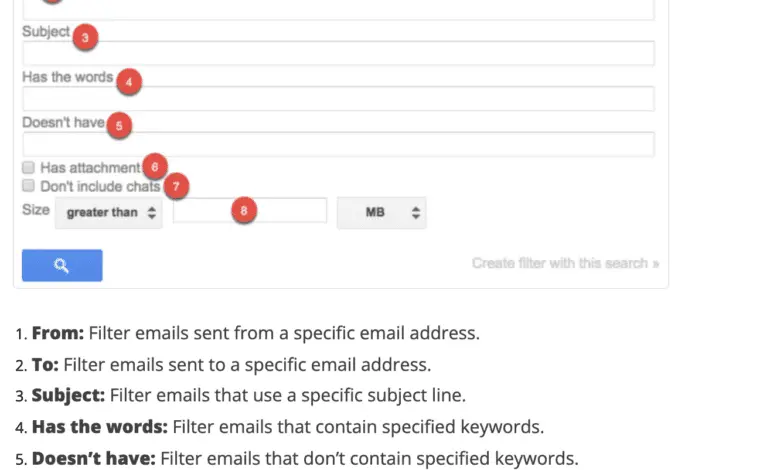
In 2023, Google expanded its filtering options by introducing a feature that allows users more control over their inbox management. This update includes the ability to create custom filters based on specific criteria such as keywords, sender addresses, and email size. This gives users deeper personalization over how their emails arrive and is particularly helpful for those with high volumes of correspondence.
Challenges with Email Filtering
Despite its effectiveness, Gmail’s filtering system is not without its challenges. Sometimes important emails may be miscategorized as spam or filtered into less frequently checked tabs. Users have raised concerns about missing crucial communications as a result. To combat this, Google advises users to regularly check their Spam and other tabs, and even create exceptions for important contacts.
Best Practices for Gmail Users
To maximize the effectiveness of Gmail’s filtering, users should take proactive steps. Regularly reviewing and adjusting filters is essential. Additionally, marking emails as “not spam” can help Gmail learn and improve filtering accuracy over time. Users are also encouraged to use the search function effectively; it allows for quick retrieval of misplaced messages.
Conclusion
In conclusion, Gmail’s email filtering features play a vital role in helping users manage their inboxes more efficiently. By understanding how these filters work and actively engaging with them, users can enhance their email experience while minimizing the risk of missing important messages. As Gmail continues to evolve, keeping informed about these features will be essential for users to maintain control over their digital communications.